This README file is the same as the README.TXT file on this CD. The slideshow is on this CD in three formats: HTML, MP4 and PDF.
HTML
The most convenient way to view the slideshow is using the web-page (HTML) format for viewing in your browser. The slideshow has been tested in Microsoft Internet Explorer, Google Chrome and Mozilla Firefox. The HTML files on this CD are produced in 1024x768. Your browser settings may allow you to expand or shrink the image to fill the window or use the full screen. This resolution permits the display of the navigation buttons without having to scroll down on each page.
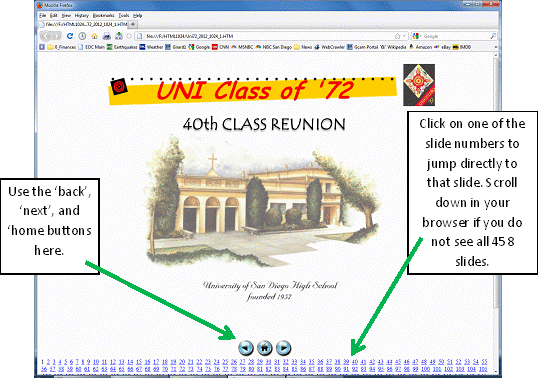
In your browser you will see several controls at the bottom of the screen permitting you to jump to any slide. At the bottom center of the screen is a 'next' and a 'previous' button, as well as a 'home' button which will take you back to the Table of Contents slide (slide #2). See the diagram below:
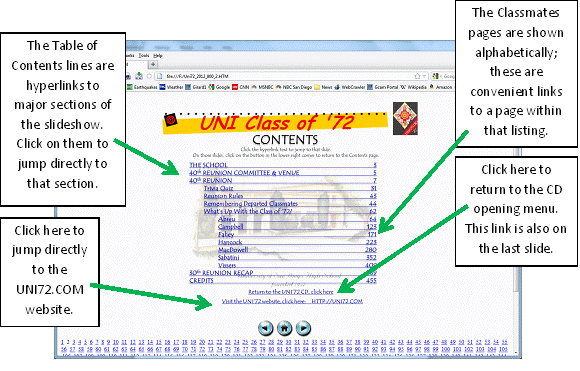
The Table of Contents, on slide #2, is made up of links to major sections of the slideshow. You can click on the link to jump directly to that section. In the alphabetically organized classmates update section (What's Up With the Class of '72?), you can jump within that section to one of the names shown, and then page forward or back to find the name you're interested in. The 'Home' button returns you to the second slide, 'Contents'.
MP4
This is a motion MPG file. If you want to watch the slideshow straight through without having to use any buttons,this is the one to use. Most browsers will support this file, it may take a few minutes to load (the video is large). If your browser does not display the file, you may have to install a small program (codec) to do so, your browser should notify you and give instructions. You can also run this file directly from the CD by browsing to the root directory and selecting it, Uni72_2012.MP4. This version is a convenient way to view the slideshow if you have your PC hooked up to a television, or if your media player (CD, DVD, Blu-ray) can run MP4 files. It can also be used with DLNA and the AppleTV device with your iPad/iPod. The timers and transitions work in the MP4, it will forward automatically. The embedded links are disabled. Because this version is a video from Powerpoint, the resolution of images is not as clear as the HTML or PDF versions.
PDF
The Adobe Acrobat PDF file is viewed using Adobe Acrobat PDF Reader, most folks already have it installed, it can be obtained freely on the web. Open the PDF file by browsing the CD and going to the subdirectory \PDF and opening the only file there: Uni72_2012.PDF. Use your 'page up' and 'page down' keys to move through the slideshow. The hyperlinks on the Table of Contents (page 2) still work, as do the 'return' arrow buttons on the bottom right of the TOC slide pages.
In all versions of the slideshow:
Photos of the reunion dinner have been added, as have a Credits page and photos of the final Reunion Organizing Committee recap and debrief dinner near the end. The photos of the 30th reunion recap have been moved to near the back of the slideshow just before the credits.
After viewing the slideshow, to get back to the opening screen you can return to CD opening menu by selecting 'Return to the Uni'72 CD' on the Table of Contents page, or on the last page of the slideshow. If you are using the MP4, use your browser's back button. You can also browse to the file UNI72_CD.HTM in the root directory (it should appear last alphabetically in the root directory listing), click it to restart the opening menu.
A link to the UNI72.COM website also appears on the very last slide, that will take you out of the CD and to the website.
If you have any questions or comments, please send them to Pete Girard, pggirard@cox.net
The current website address is http://uni72.com. This site will remain up at this address for at least the near future. Please visit occasionally and send us an e-mail about any classmate updates (including yours) that you may learn.